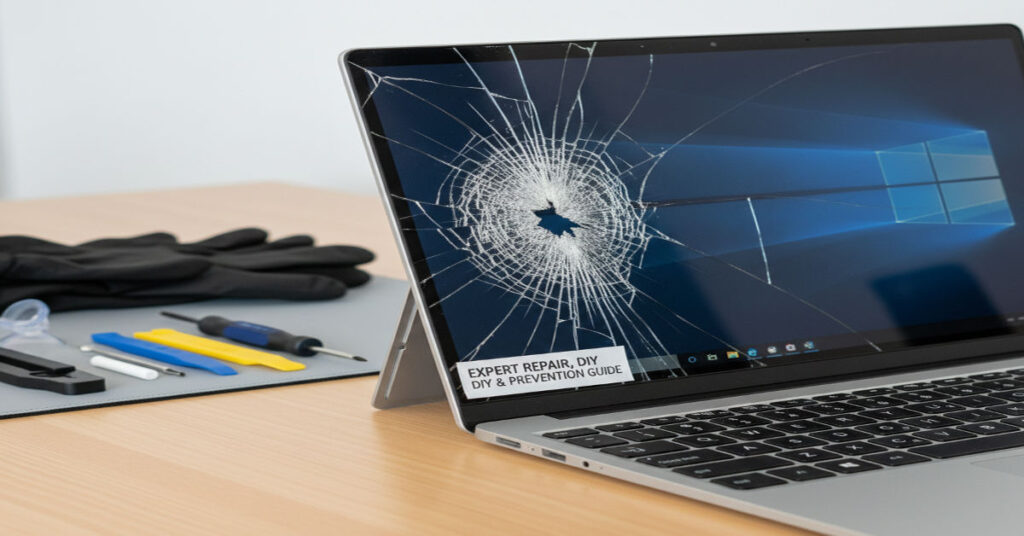

A cracked screen on the Microsoft Surface Laptop 3 represents a critical disruption for users who rely on the device for both professional and personal tasks. It is essential to understand that the device’s thin, glued display assembly makes partial fixes impossible, often requiring a full replacement. The challenge is compounded by high repair costs and the potential for workflow disruption, making informed decision-making essential.
Released in 2019, the Surface Laptop 3 comes in 13.5-inch and 15-inch sizes with high-resolution PixelSense displays. The integrated glass and digitizer assembly is sleek but fragile. Cracks range from minor hairline fractures affecting touch sensitivity to severe breaks that render the device inoperable. This guide provides a flagship-level, deeply detailed look at repair options, cost analysis, DIY procedures, preventative strategies, and operational considerations.
Structural Vulnerabilities and Risk Surfaces
The Surface Laptop 3 balances elegance and thinness with a glued display design. While visually seamless, this approach creates vulnerability. Pressure on edges or corners can propagate microfractures, compromising both touch functionality and screen integrity. Leo Hartmann observes, “Surface devices trade repairability for design elegance, creating a risk surface where a single crack can disable multiple functions.”
Drops, transport pressure, and thermal cycling are common contributors. Once a crack appears, it may spread, introducing pixel anomalies, ghost touches, or full touch failure. For professionals and creative users, this translates into disrupted workflows, lost productivity, and potentially expensive downtime.
Professional Repair Options
Microsoft’s standard warranty excludes physical damage, though Microsoft Complete protection covers accidental cracks. Users can contact Microsoft Support via website or app to verify eligibility. Some report successful low-cost out-of-warranty exchanges by describing minor hairline cracks instead of impact damage. Out-of-warranty replacement typically ranges $450–$750.
Authorized repair centers, such as JCD Repair, provide professional fixes starting at $269 for the 13.5-inch model and $349 for the 15-inch, including parts and labor guarantees. This ensures both functional and structural integrity.
| Repair Type | 13.5-inch Cost | 15-inch Cost | Notes |
| Third-Party Service | $269 | $349 | Parts and labor with lifetime guarantee at some shops |
| Microsoft Out-of-Warranty Exchange | ~$450–$750 | ~$450–$750 | Device swap, not just screen replacement |
| DIY Replacement | $140+ | $140+ | Cost-effective but requires high skill and caution |
DIY Replacement: Risks and Procedures
For technically proficient users, iFixit provides step-by-step guides for both 13.5-inch and 15-inch models. Procedures include removing rubber feet, prying the C-cover, disconnecting ribbon cables, and unscrewing hinges with a T6 Torx driver. Tools required include a spudger, isopropyl alcohol, ESD precautions, and a replacement assembly ($140–$200).
DIY repair carries inherent risk. Mishandling display cables, adhesive, or hinges can render the device unusable. Hartmann cautions, “Even minor errors in ribbon cable reconnection can disable the digitizer entirely, transforming a repair attempt into a total loss.”
Common DIY Pitfalls
- Damaging fragile ribbon cables during disassembly
- Applying uneven heat when loosening adhesive
- Misaligning the display during reinstallation
- Neglecting ESD precautions, risking short circuits
Cost Analysis and Operational Implications
Repair decisions extend beyond cost. Third-party services offer predictability and warranty coverage, while Microsoft exchanges replace the full device at higher expense. DIY repair is the least costly but high-risk. Operational downtime can translate into lost hours or business disruption, especially in corporate environments.
| Service | Pros | Cons |
| Third-Party | Lower cost, professional warranty | Limited locations, variable quality |
| Microsoft | Full device replacement, certified repair | Higher cost, limited flexibility |
| DIY | Cost-effective, immediate | High skill required, risk of complete failure |
Hartmann emphasizes, “From a business perspective, operational disruption and device downtime can exceed any direct savings from DIY repair.”
Replacement Part Sources
Replacement assemblies should come from official Microsoft parts programs or reputable suppliers. Authentic assemblies include bezel, hinges, and digitizer. Low-cost alternatives may omit critical components, compromising touch responsiveness and structural durability. Verified resellers include SurfaceParts.com and eBay vendors with proven authenticity.
Preventing Future Screen Damage
Mitigation requires protective accessories and safe handling. Use padded cases and keyboard covers, avoid stacking objects on the device, and carry it in properly sized compartments. Screen protectors prevent scratches from propagating into fractures. TechRadar’s 2021 survey found protective measures reduce accidental screen damage by 43%.
Professional Repair Insights
Technicians stress precision. Heat must be applied carefully to soften adhesive without damaging the screen. Disconnecting the battery before starting is critical to prevent shorts. Hartmann notes, “The integrated infrastructure of the Surface Laptop 3 means improper separation can trigger cascading failures.”
Post-repair evaluation includes checking touch responsiveness, hinge alignment, and screen calibration to ensure operational integrity.
Operational Considerations Post-Repair
Even a successfully replaced screen can shift over time if adhesive is uneven. Monitoring touch performance, color accuracy, and hinge movement is necessary to maintain usability. Diagnostic software and calibration tools help ensure that repairs meet functional standards.
Broader Economic Implications
Microsoft exchanges reset device warranties and may affect resale value. DIY repairs may void warranties. The holistic cost-benefit includes repair expenses, downtime, and productivity loss. Hartmann observes, “Effective decision-making requires balancing direct costs against operational continuity and warranty considerations.”
Emerging Alternatives and Industry Trends
Startups are exploring modular, adhesive-free displays to simplify repairs. This trend reflects broader debates on sustainability, repairability, and manufacturer responsibility. The Surface Laptop 3 illustrates the tension between sleek design and practical long-term device stewardship. As Ava Morgan notes, “The design choices here raise ethical questions about consumer agency and long-term technology sustainability.”
Takeaways
- Surface Laptop 3 screens are highly vulnerable due to glued design.
- Microsoft warranty excludes physical damage; Microsoft Complete may cover accidental cracks.
- Third-party repairs offer lower cost and warranty coverage.
- DIY repair is cost-effective but carries high risk and requires precision.
- Protective measures significantly reduce accidental damage.
- Professional repair ensures both structural and functional integrity.
- Operational and economic implications extend beyond repair costs.
Conclusion
A cracked Surface Laptop 3 screen presents complex technical and operational challenges. Professional repairs provide reliability, structural integrity, and reduced risk, while DIY approaches save money but increase potential for error. Preventative strategies, such as protective cases and careful handling, remain the most effective long-term solution. Beyond immediate repair, considerations include productivity, warranty status, and resale value, emphasizing the broader Cracked Surface Laptop 3 Screen implications of device design and repairability.
FAQs
Is Surface Laptop 3 screen replacement covered under warranty? Only with Microsoft Complete protection; standard warranty excludes physical damage.
How much does a professional repair cost? 13.5-inch repairs start at $269, 15-inch at $349; Microsoft exchange ranges $450–$750.
Can I replace the screen myself? Yes, with proper tools and skill, but risk of damage is high.
Where can I buy replacement screens? Authorized Microsoft parts sellers or verified third-party vendors.
How can I prevent future cracks? Use padded cases, avoid pressure near edges, and carry in protective compartments.
References
iFixit. (2023). Surface Laptop 3 Screen Replacement Guide. Retrieved February 12, 2026, from https://www.ifixit.com/Guide/Surface+Laptop+3+Screen+Replacement
Microsoft Support. (2023). Surface Laptop 3 Service Options. Retrieved February 12, 2026, from https://support.microsoft.com/surface
TechRadar. (2021). Preventing Laptop Screen Damage: Survey Insights. Retrieved February 12, 2026, from https://www.techradar.com/laptop-screen-prevention
JCD Repair. (2024). Surface Laptop 3 Repair Services Overview. Retrieved February 12, 2026, from https://jcdrepair.com/surface-laptop-3-repair